Vision / Machine Learning
Documentation
The official Limelight Documentation and PhotonVision Documentation have more detailed steps and will be referenced throughout.
Terms
Limelight: All-in-one system used to get vision up and going quickly and with little code. Utilizes NetworkTables to trasnmit vision data. Has easy to use web dashboard.
PhotonVision: “One half” of Limelight, just has the web-dashboard and supports various hardware (Raspberry Pi, Orange Pi, Limelight, etc.)
Hue, Saturation, and Value (HSV): A color model more commonly used for vision applications than RGB. It represents the below color wheel.
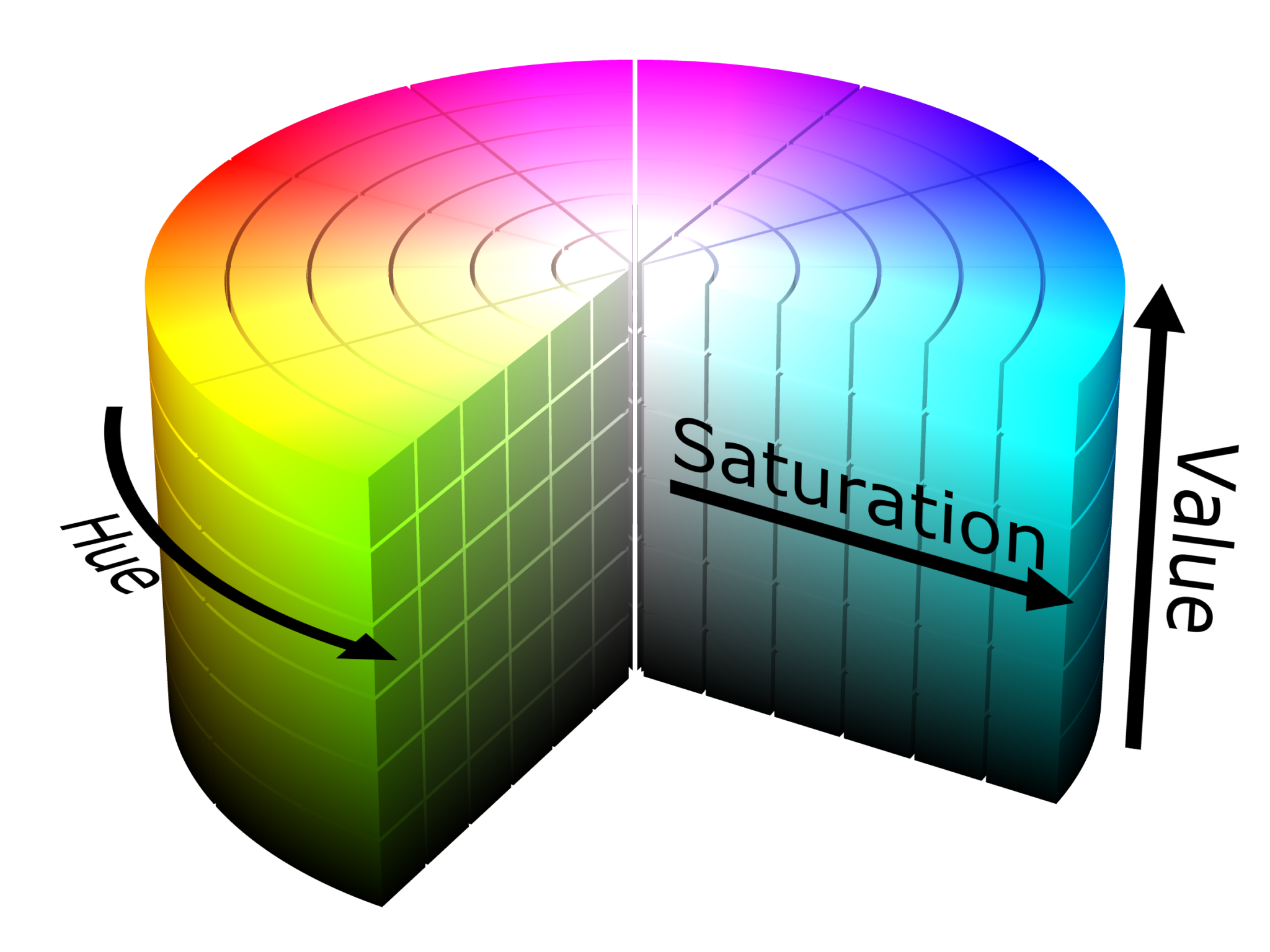
Hue: The color, or rotation around the model. It ranges from 0 - 360 degrees.
Saturation: The amount of gray in a color, from 0 - 100% (Can also appear from 0 - 1 where 0 is gray and 1 is the primary color).
Value/Brightness: Works with saturation and describes the brightness/intensity of a color. Expressed from 0 - 100%, where 0 is completely black, and 100 is the brightest.
Color Thresholding: Creates a binary (black and white) image based on if pixels in image fit within a specified range of Hue, Saturation, and Value. -Simple to set up but can vary greatly between competitions and even different matches due to dependency on lighting conditions.
Vision Use Cases
Aiming a shooter or rotating robot based on horizontal or vertical offset from an image (uses april tags).
Rotating/ to a target (game piece, field element, etc.) by calculating distance with AprilTag data or using area on screen with math to guess based on distances previously tested (uses AprilTags, Machine Learning, or color thresholding).
Detecting robots or game pieces (Machine Learning, color thresholding).
Many more I can’t think of
Target Types
Game Piece / Field Element Detection
Game Piece and Field Element detection can be done simply with HSV thresholding or with Machine Learning (PhotonVision currently doesn’t support Machine Learning, would have to use another solution on a Pi or use Limelight). FRC game pieces are commonly monochrome so HSV thresholding is a quick way to get detection up and running. This can give us x and y offsets in the form of pixels. Camera characterization and collecting data based on distance can give us a distance measurement as well. Machine Learning is a “smarter” way of detecting game pieces that can give more data and be more specific about detections. ML can classify objects with more than just color and allow us to do more based on what specific type of object is detected.
Software Solutions on Co-Processor
PhotonVision
Note
This needs a co-processor (raspberry/orange pi) or runs on a LimeLight 2
Similar functionality to Limelight, still communicates over NetworkTables and supports different pipelines (hsv thresholding and AprilTags). Needs some additional setup to image a co-processor, not plug-and-play like Limelight.
OpenCV
Note
This needs a co-processor (or technically can run on the RoboRio but don’t) blah
OpenCV is a library used for all sorts of various
GRIP
TODO: pull doco This needs a co-processor (or technically can run on the RoboRio but don’t).
TensorFlow
TODO: pull doco This needs a co-processor.
AXON / Amazon Web Services
TODO: pull doco
Combined Hardware/Software Solutions
Limelight (can leverage Google Coral)
TODO: pull doco
Pixy cam
TODO: pull doco
JeVois
TODO: pull doco